9.4.09

Olivetti SIMPLE_WAY Bluetooth: setup and impressions

Hello @all,

sometime ago I bought at eBay used printer Olivetti SIMPLE_WAY. It has built-in Bluetooth, and this was the only reason for buying (I hate cables and try to exploit the Bluetooth on my laptop as much as possible). I paid something like 32 EUR (incl. delivery). The black inks were empty (so, I had to buy it extra - 28 EUR @eBay for the new cartridge (IN 502) inclusing delivery).

After 1 week of waiting it arrived. I cannot say it was a love from the first sight. The colour of the deice - white - doesn't actually match the colour of other deices I have (black laptop and black boxes). Besides, I underestimated the size of the printer. It was optically too big for my desk. After trying a couple of combinations I finally left it on the desk container near the table - close enough to connect with the cable, but not directly on the desk.

(1) Setting it up...
As I said, the printer is equipped with a Bluetooth module. It sounds cool, but it's a marketing trick. The problem is that via Bluetooth this device acts like a printer only. So, no way to scan, copy or print photos. Just an ordinary printer... OK, it's too late to object.

Another issue, which bothers me, is a Linux compatibility. The device is NOT Linux-compatible. Neither printer nor scanner can be recognized and used. So, keep in mind - this is 100% Windows-oriented device. At
least, now...

The printer setup can be divided into two steps. Step 1 is USB-based setup. It's quite straightforward and is well described in the user's guide of the printer. Mainly, you install two pieces of software - the driver and
maanagement application, which allows you to perform all the functions (print photos, scan, and copy). Besides, you get a couple of utilities for printer's maintenance.

Step 2 is making Bluetooth connection between PC/laptop and printer. And this is much more fun, than USB! I suppose, that the steps described in the guide, were oriented on the Microsoft's Bluetooth stack, coming with SP2 of the XP. Since I have a Widcomm stack, those steps didn't work for me. After several evenings of tests I finally managed to get it running. So, here are the steps - for those who may be interested:

  1. Download and install the newest Widcomm stack (in my case I got it from the the support site of Lenovo);
  2. Start "Install new printer..."-wizard from Control Panel, section "Printers and faxes";
  3. Click "Next" on the welcome screen;
  4. Select local printer, uncheck "Plug and Play" recognition click "Next";
  5. And now be careful: select "Create new port" option on the next screen (and not "Use following port", as user's guide recommends);
  6. First option "Bluetooth printer" becomes selected. Click "Next";
Actually, at this moment wizard opens a new, smaller window, in which available Bluetooth printers are shown. Select Olivetti, enter PIN (if you any is set in the Bluetooth properties of the printer). Your computer builds pairing with the printer, new COM port is being created, and printer gets connected.

The rest of the installtion is straighforward. Since you have already installed the drivers, they get selected automatically - keep the selection. Skip printing of the test page.

(2) Running it...
So, when you get your connections configured, you may use the device. As I mentioned above, when operating via Bluetooth, only printer is available. When connected via the USB cable, you can do everything:

  • print photos - good quality, some basic functions for the image improvements (white balance, contrast, etc.);
  • scan to different destinations (file, application, fax, mail) - OK. The only thing you must keep in mind, is that the software supports 2 types of the files only - BMP and JPG. And the type of image is defined by fileextension! So, if you decide to save it as PNG, you will get BMP-file with "PNG"-extension. Do not be surprised by the huge size;
  • copy - OK;

(3) Impressions
As I said in the very beginning, when I saw the printer for the first time, I could not say I liked it. Now I can. I had a couple of occasions to use this device quite intensively, and it seems to be rather solid and reliable.

Pros:

  • Bluetooth;
  • photo printer with quite good quality;
  • useful software;
  • PictBridge interface - not tested yet;

Cons:

  • expensive and proprietary cartridges;
  • limited functionality via Bluetooth;
  • not Linux compatible;

(4) Conclusion
Just an ordinary multifunctional device, an average in its class. Bluetooth feature makes it very interesting for those, who hates cables, but limited functionality (when connected via Bluetooth) and incompatibility with Linux must be kept in mind.

Cheers,

Andrey.

19.3.09

Bluetooth applet in GNOME (v 0.27): resolution of the problems

Hello everyone,

many users recently reported problems with GNOME's "Bluetooth applet" - like missing services or unability to connecto to other devices. In my case I had all functions working - but only when logged in as root. As an ordinary user I had an applet in the notification area, but it was "dead".

Searching a lot in the Internet, I occasionally found this bug report: http://www.mail-archive.com/debian-bugs-dist@lists.debian.org/msg611962.html. When I added myself to the "netdev" group, the applet started to work again.

So, if you have problems with "Bluetooth applet", just try to add your users to the "netdev" group.

Cheers,
Andrey.

10.3.09

Debian Lenny: new configuration of WLAN and ACPI

Hello everyone,

recently I have discovered two unpleasant issues:

1) my WLAN radio is always on (even if the interface it not up) - which is
bad for my battery;
2) my laptop started to do "double resume" - when waking up from sleep
mode, it starts very shortly, and then goes to sleep again. So, I have to
press FN+F4 or close and open the lid again in order to wake th laptop up.

So, I decided to resolve those two issues:

(1) WLAN
In order to switch the radio off, one should issue a command

echo 1 > /sys/bus/pci/drivers/ipw2200/*/rf_kill

This command must be issued after the ipw2200 module is loaded. In order to
avoid manual execution everytime I boot my laptop, I decided to create a
kind of "autostart" for this command. Following a hint of good people in
one forum, I did the following:
(1) created in /etc/init.d/ file named myAutostart_AG.sh
(2) put there command
#!/bin/sh

echo 1 > /sys/bus/pci/drivers/ipw2200/0000\:0b\:02.0/rf_kill

Please, notice the PCI address of the WLAN card in the command (instead of
"*" - somehow I couldn't use "*" in a script).
(3) created a link from /etc/init.d/myAutostart_AG.sh into
/etc/rcS.d/99myAutostart_AG.sh
(4) made all scripts executable

That's all. Now this command is executed everytime when my laptop boots.
More details for the procedure can be found in this post:

http://forums.debian.net/viewtopic.php?p=212925#212925

Additionally I created a file called ipw2200_options in the folder
/etc/modprobe.d. This file contains following options of the driver
options ipw2200 hwcrypto=0
options ipw2200 associate=0

hwcrypto helps to avoid problems with encryption of the channel (WPA/WEP)
and associate disables autoconnect to the first available network. When you
are on a battery, it saves you a lot of power.


(2) "Double resume"
The issue is described in this post very well:
http://forum.thinkpads.com/viewtopic.php?f=9&t=64884&start=0&hilit=X21%2C+resume

So, I tried the solution proposed by GomJabbbar. It didn't work - Debian
has no "suspend-s2ram" package. But short analysis of the /etc/acpi/events
folder delivered following results: I have (had) two events - "lid" and
"sleep", - which were processed by one single script sleep.sh AND several
events stating with "lm_" - like "lm_lid", "lm_ac_adapter" and others. Many
of those scripts where calling - via their corresponding event scripts -
the same programm /usr/sbin/laptop-mode with a parameter "auto". I asked
Google about those files. It looks like they were installed by
"laptop-mode" package. The first two events - "lid" and "sleep"- I created
manually in July 2007 (see my posts in this blog from that time). For me
the issue is caused by these custom scripts. I think, the following
happens: when I generate either "sleep" or "lid" event, first "sleep.sh"
event is fired. It puts my laptop to sleep - on old-fashioned manner. When
it wakes up, the event is processed second time by "lm_lid", which brings
the laptop into second sleep state.

The resolution for me is to rename my custom events "sleep" and "lid". In
this way I pass the precssing to the "laptop-mode" utility. I tested the
result briefly - it looks good, the laptop wakes up properly.

Cheers,
Andrey.

7.2.09

Home desktop: perfect hardware set

Hello,

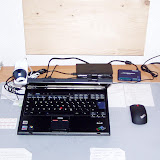
recently I asked my self a question: what does any average user need for his/her home desktop/laptop? I just analyzed what I have and tried to create a kind of "must-have"-list of hardware devices I regularly use. My laptop is Thinkpad T43p (2668 PEG).

So, here comes what I have:
1) Thinkpad T43p;
2) external drive "Western Digital", 2,5", 250 GB (130 GB are even not formatted so far);
3) Bluetooth mouse by Lenovo - with Thinkpad logo, black. Matches perfectly my T43p. :-)
4) Logitech QuickCam Chat;
5) speakers Logitech Z10 - quite expensive, but - again - match my T43p. Black and stylish... :-)

I think, that's all so far. Of course, I have a couple of PC cards (like network interface, WLAN or USB hub), but I use them very-very rarely.

What do you use at home? Put your favorite hardware in responses, let's create a TOP 10 of home peripherals. :-)

Cheers,
Andrey

Update (24.02.2009): I forgott to mention my external card reader and - newly purchased at eBay - colour printer Olivetti Simple Way with Bluetooth module.

Update (12.04.2009): here are some photos of my desk.
My desktop / T43p & Co.


Update (22.09.2009): recently I bought two new pieces - wireless desktop set Labtec Edge and IBM Port Replicator II. I want to post updated photos and short review ofn them soon... See my posts in September...

5.1.09

ASCII-Export in SSIS: bug

Hello everyone,

recently I discovered one issue in the SQL Server Integration Services (SSIS), which I would name "bug". I decided to inform everyone about this thing - perhaps, this will help you.

So, imagine the following situation: you have a DB-table with a column named "BK" (for instance). You wish to export this table into CSV-file. You configure the output of "ASCII Destination" in such a way, that "BK" column is redirected to "BK_QUE" column of the ASCII file (and "BK" column of the file should be left empty). What does SSIS do? It outputs "BK" into "BK_QUE" (as desired) AND - at the same time - into "BK"! See the screen-shot for more details.

So, always keep in mind, that SSIS links the columns with the equal names by default (even if you set "Ignore" explicitly), if you create such an export item in your Data Flow Task.

Cheers,
A..

9.11.08

Debian on T43p: Show Must Go On... (From Etch to Lenny)

Hi@all,

last week I had nothing to do on Tuesday evening, so I decided to update my installation of Debian Linux from etch (Stable) to Lenny (Testing). Actually, I wanted to do it for quite long time: I knew that Lenny would bring a lot of new functions and improvements, so I did not think too long and replaced - quite bravely - the word "stable" with "testing". And here comes my story... :-)))

1. Updating kernel and GNOME (Wave 1).
My first step was to update kernel and GNOME. The update itself ran properly, but I made a mistake when selecting the kernel - I choose *-486 instead of *-686. As a result, I got only 885 MB of RAM (instead of 2 GB). I fixed it on the next day, what I describe later.

The installation/update of GNOME was easy and smooth. At the end I got the newest version of GNOME - with better appearance, better Bluetooth support, better applications. Simply better GNOME. :-)

2. Updating the rest (Wave 2)
When my kernel and GNOME were updated, I decided to update the rest. I simply went to Synaptic and selected "Mark all updates". In this way I got all the latest packages belonging to Lenny.

Having all updates installed, I checked most important functions (like WLAN, sleep mode, Bluetooth connection to the mouse) and went to bed.

3. Fighting with issues (Wave 3)
On the next day I decided to change my kernel. So, I selected the right *-686 version of the kernel and tried to install it. No way! I got an error message in Synaptic and new kernel was not installed. Better to say, it was physically installed, but no link was written into GRUB menu file. After searching for a long time I found out, that my Grub (as a software) become bug 501306 (http://bugs.debian.org/cgi-bin/bugreport.cgi?bug=501306) and must be fixed. I corrected my device.map file by adding the following line there:

(hd0) /dev/sda

That fixed all issues with the installation of the new kernel and deinstallation of the old one.

In order to install the proprietary driver for the ATI card used in my laptop, I followed the instructions found on this page (http://wiki.cchtml.com/index.php/Ubuntu_Dapper_Installation_Guide). They are newer, then those I published last year for Etch.

In order to resolve the issue with cpufreq - it could not find the "ondemand" governor while booting - I installed "cpufrequtils" package.

4. Conclusion and feedback
In general I'm more than satisfied with both update (how it ran and worked) and with new version of Debian. The small issues (with GRUB and cpufreq) can be resolved rather quick and painless.

The only warning I want to give you is the download time. Synaptic needs something around 1.2 GB to download for all updates. Even with DSL (I have 16 Mbit/sec) it takes some time. Don't start such an update like "I do it while preparing for the bed"-action. It will take some your time and attention.

I hope, this short post is useful for others. As usually, any feedback is welcome.

Cheers,
Andrey

28.10.08

New webcam and Skype!

Hello everyone,

on Sunday I bought a webcam. It's Logitech QuickCam Chat - very simple, but that is more than enough for me. And - what is important - supported by Linux. :-)

So, from now I'm available in Skype under "Andrey_HH" - and even with video. :-)